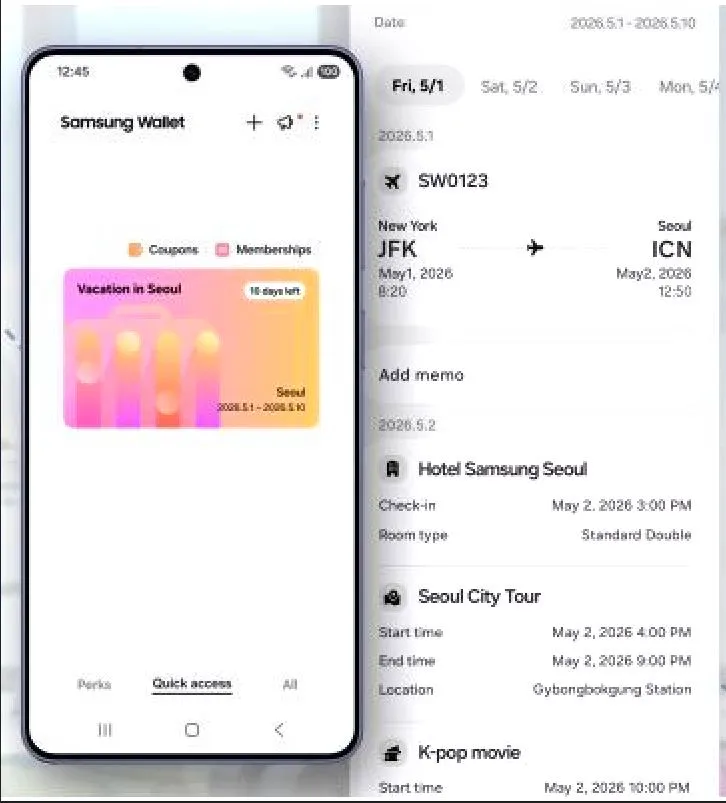
Picture this: you’re at the airport, flight leaves in an hour, and you’re frantically digging through your inbox trying to find that hotel confirmation you booked three weeks ago. Sound familiar? Samsung clearly noticed this pain point because their latest addition to Samsung Wallet — a feature called Trips — is basically designed to make that nightmare a thing of the past.
So what exactly is Trips? Think of it as a personal travel assistant that lives right inside your Galaxy phone. Instead of your trip details being scattered across five different apps, a handful of emails, and maybe even a few WhatsApp messages your partner forwarded you, everything gets pulled into one clean, scrollable timeline. Flight at 9am, hotel check-in at 3pm, concert tickets for 8pm — it all lines up in order, the way your actual day unfolds.
The magic here is really in how it handles organization. When you add a boarding pass or a ticket to Samsung Wallet, the app doesn’t just store it — it actually reads the time, date, and location attached to it and slots it into exactly the right spot on your trip timeline. Flying into Paris at noon and checking into your hotel two hours later? The app treats those as connected moments in the same journey, not two random cards floating around in your wallet.
But what about the stuff that doesn’t come with a QR code? This is where things get genuinely useful. Say you’ve booked a restaurant for dinner — no digital ticket, just a reservation number scribbled somewhere. Trips lets you add that manually, along with notes like the address, the contact number, or a reminder that dress code is smart casual. Those little memos attach directly to the timeline entry, so your context lives right where you need it, not buried in your notes app.
The range of things it can handle is impressive. Flights and boarding passes are the obvious ones, but Trips also covers hotel bookings, car rentals, train and bus tickets, theme park passes, sporting events, concerts — basically the full spread of what a modern trip actually looks like. And because all of these can chain together, a multi-city journey — say, flying to Tokyo, taking a bullet train to Kyoto, and then hopping a ferry — shows up as one continuous story rather than a pile of disconnected bookings.
There’s also a practical reliability angle worth appreciating. Since all your tickets and memos are stored directly on the device, you don’t need a data connection to access any of it. Roaming charges at an international airport? Spotty hotel Wi-Fi? Doesn’t matter. Your itinerary is right there, loading instantly, no spinning wheels required.
On the security side, Trips runs inside Samsung Wallet, which is protected by Samsung Knox — the same hardware-level encryption that secures your payment cards and digital IDs. Your itinerary is locked behind your fingerprint, face, or PIN, and Samsung is explicit that your travel data isn’t being harvested for ads or shared externally. If your phone gets stolen, remote wipe can clear everything.
It also plays nicely with the rest of the Samsung ecosystem. If your gate changes or your flight gets delayed, the update surfaces directly in the timeline. The Now Bar on your lock screen can nudge your boarding pass to the front automatically when you’re close to departure time. And if you’ve got Samsung Calendar set up, events you’ve saved there can mirror into your trip view too, so nothing falls through the cracks.
Trips launched in April 2026, initially rolling out to Galaxy users in South Korea, the United States, and the United Kingdom, with broader availability coming over time. As more airlines, hotels, and booking platforms partner with Samsung, the timeline will get richer and more automatic.
The bottom line? Trips doesn’t reinvent travel — it just quietly removes the friction that makes navigating it stressful. For anyone who’s ever stood confused in an unfamiliar airport, thumb-scrolling through emails looking for a confirmation code, this is the feature you didn’t know you needed until someone finally built it.