Android 17 brings a genuinely useful new tool called Pause Point — a feature built directly into the operating system to help users break the habit of mindless scrolling. If you regularly lose track of time on TikTok, Instagram, YouTube, or X, this feature was designed with you in mind. Here’s what you need to know, ranked from most to least important.
- The Core Idea: A Forced 10-Second Wait
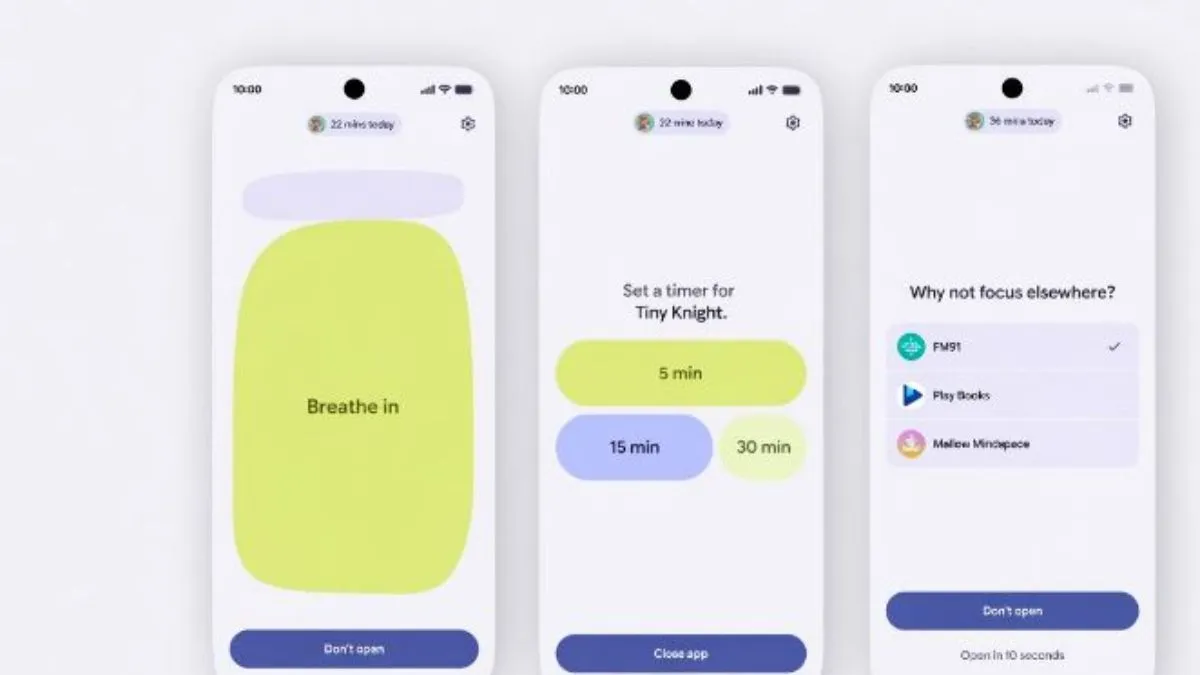
The moment you tap a social media or short-video app, your phone no longer opens it instantly. Instead, Android shows a waiting screen for a full 10 seconds. There is no skip button — you simply wait. This deliberate delay targets the reflex of opening apps without any conscious intention, giving your brain a brief window to reconsider.
- The Pause Screen Prompts Real Reflection
Those 10 seconds aren’t empty. The screen asks a pointed question — “Why am I here?” — pushing you to think about your actual reason for opening the app. Beyond that prompt, the screen can also display a short breathing exercise to calm the impulse, a small carousel of personal photos you’ve marked as meaningful (family, fitness goals, travel memories), and suggestions for alternative activities like audiobooks or meditation apps. It’s a genuinely thoughtful design, not just a timer.
- You Control Which Apps Trigger the Pause
Pause Point is not a fixed blocklist. You decide which apps count as “distracting” for you — whether that’s mainstream platforms or niche video apps and games. Apps you don’t tag, such as email, banking, or navigation tools, open completely normally. This customization keeps the feature practical rather than annoying for everyday tasks.
- Session Timers Add an Extra Layer of Discipline
From the pause screen itself, you can set a session timer — typically 5, 15, or 30 minutes. When the timer runs out, Android sends a reminder to step away. Crucially, it does not force-close the app. The system acts more like a coach than a jailer, giving you a gentle nudge while leaving the final decision to you.
- It Adds Friction Without Taking Away Access
Pause Point never blocks or uninstalls anything. Every app remains fully accessible — the feature simply makes opening them feel slightly less automatic. This distinction matters: it’s designed around behavior change through friction, not punishment. Users who genuinely need an app can still reach it; the goal is to filter out the unconscious, purposeless opens.
- Turning It Off Requires a Phone Restart
This is a deliberate design choice. Disabling Pause Point isn’t a quick toggle — Google requires you to switch it off and then restart your device. The intention is to prevent impulsive disabling in a moment of weakness. Much like the feature itself, even opting out demands a conscious, effortful decision.
- It Works Differently From Older Digital Wellbeing Tools
Previous Android wellbeing features mainly tracked usage after the fact — showing you that you spent two hours on YouTube once the damage was done. Pause Point works at the front end, intercepting behavior the moment it begins. Together with existing tools like Focus Mode and app timers, Android now operates on three levels: preventing overuse before sessions start, interrupting habit at launch, and reporting patterns afterward.
- It’s Built Into Android 17 at the OS Level
Because Pause Point lives inside the operating system itself, it works across all compatible apps without requiring developers to build anything themselves. It will arrive on Pixel phones first, with other Android devices following based on manufacturer and carrier update schedules.
Final Thought
Pause Point won’t transform your relationship with your phone overnight, but it introduces something genuinely valuable: a small moment of choice where none existed before. For users serious about reducing screen time, that 10-second pause — used honestly — could make a meaningful difference over time.